In this Episode, I have tried to connect several Raspberry pi Cameras on the same Network and make them as an HTTP server to send Images over the Network. Sending images over Http is much faster than rtsp protocol, why i do not know! But i did not face any Delay or latency in receiving the Images. By the way i am using these cameras as webcam in my room and i would like to use them for my Heater project.
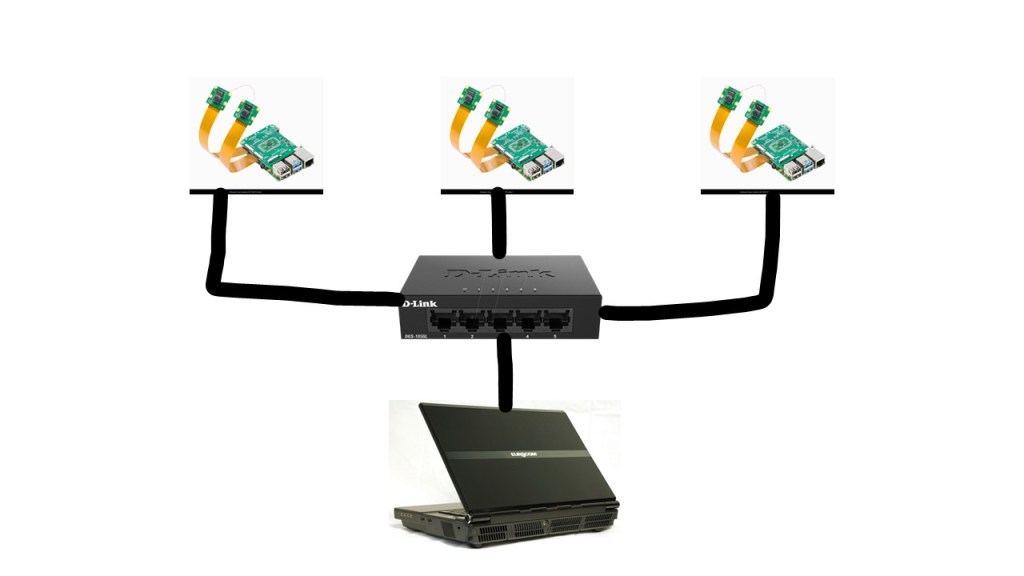
Ok first things first, I have shown you the topology of our network as below:
I also put the Code below to be run on your Raspberry pi. When you have installed python on your raspberry pi, you just need to run this code on a python IDE and see the images from the camera on your laptop web browser.
To see the images on your browser, you need to type the IP address of the Raspberry pi.as an example: http://192.168.1.x:8000/stream.mjpg
Code:
import io
import picamera
import logging
import socketserver
from threading import Condition
from http import server

PAGE="""\
<html>
<head>
<title>picamera MJPEG streaming demo</title>
</head>
<body>
<h1>PiCamera MJPEG Streaming Demo</h1>
<img src="stream.mjpg" width="640" height="480" />
</body>
</html>
"""

class StreamingOutput(object):
    def __init__(self):
        self.frame = None
        self.buffer = io.BytesIO()
        self.condition = Condition()

    def write(self, buf):
        if buf.startswith(b'\xff\xd8'):
            # New frame, copy the existing buffer's content and notify all
            # clients it's available
            self.buffer.truncate()
            with self.condition:
                self.frame = self.buffer.getvalue()
                self.condition.notify_all()
            self.buffer.seek(0)
        return self.buffer.write(buf)

class StreamingHandler(server.BaseHTTPRequestHandler):
    def do_GET(self):
        if self.path == '/':
            self.send_response(301)
            self.send_header('Location', '/index.html')
            self.end_headers()
        elif self.path == '/index.html':
            content = PAGE.encode('utf-8')
            self.send_response(200)
            self.send_header('Content-Type', 'text/html')
            self.send_header('Content-Length', len(content))
            self.end_headers()
            self.wfile.write(content)
        elif self.path == '/stream.mjpg':
            self.send_response(200)
            self.send_header('Age', 0)
            self.send_header('Cache-Control', 'no-cache, private')
            self.send_header('Pragma', 'no-cache')
            self.send_header('Content-Type', 'multipart/x-mixed-replace; boundary=FRAME')
            self.end_headers()
            try:
                while True:
                    with output.condition:
                        output.condition.wait()
                        frame = output.frame
                    self.wfile.write(b'--FRAME\r\n')
                    self.send_header('Content-Type', 'image/jpeg')
                    self.send_header('Content-Length', len(frame))
                    self.end_headers()
                    self.wfile.write(frame)
                    self.wfile.write(b'\r\n')
            except Exception as e:
                logging.warning(
                    'Removed streaming client %s: %s',
                    self.client_address, str(e))
        else:
            self.send_error(404)
            self.end_headers()

class StreamingServer(socketserver.ThreadingMixIn, server.HTTPServer):
    allow_reuse_address = True
    daemon_threads = True

with picamera.PiCamera(resolution='640x480') as camera:
    camera.rotation = 180
    camera.framerate = 15
    output = StreamingOutput()
    camera.start_recording(output, format='mjpeg')
    try:
        address = ('', 8000)
        server = StreamingServer(address, StreamingHandler)
        server.serve_forever()
    finally:
        camera.stop_recording()

Donation
Please help me to create content for this Podcast and Blog 🙂
$1.00




 DyM Podcast
Leave a comment